Showing posts with label interval workout. Show all posts

10.6.16

Long Run Thursday: Hot as he!!

Plan: Wake up at 5am, run 14 miles.  Don't be late to work.
I did in fact wake up at 5am.  To a thunder storm.  I had no backup indoor workout planned.  This is what doom looks like.

Plan B: Run after work.  14 miles would be good but whatever.  It will be over 80* so be careful out there.
Updated plan B: It's really hot.  Intervals will be a good idea. 
Update to the update: This is nuts.

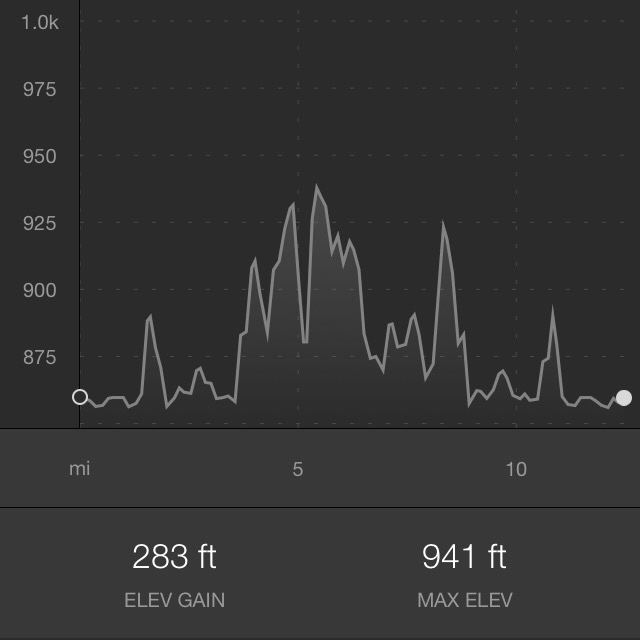
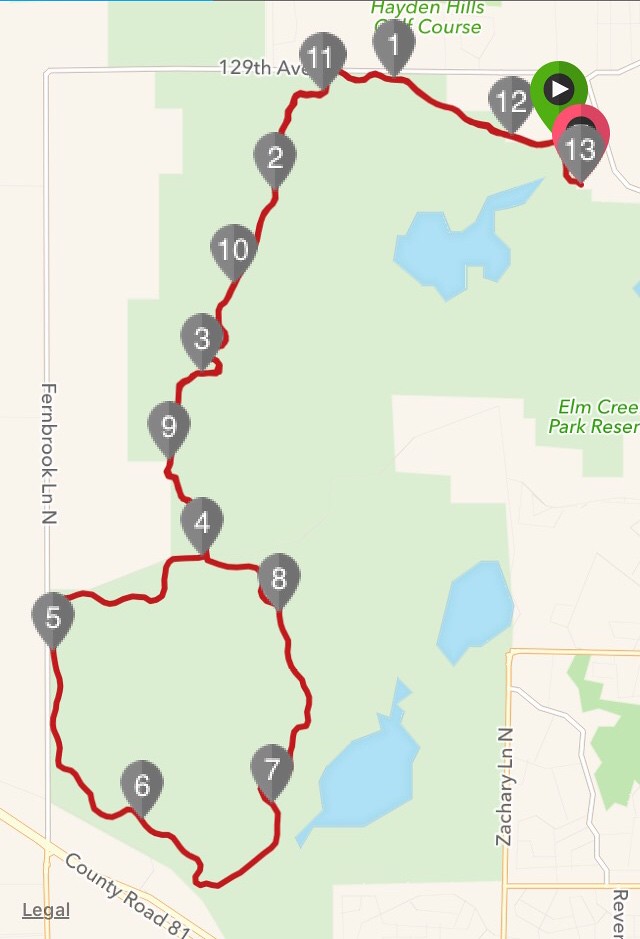
Route: I used my outdoor adventure route at Elm Creek.  This is all paved bike trail.

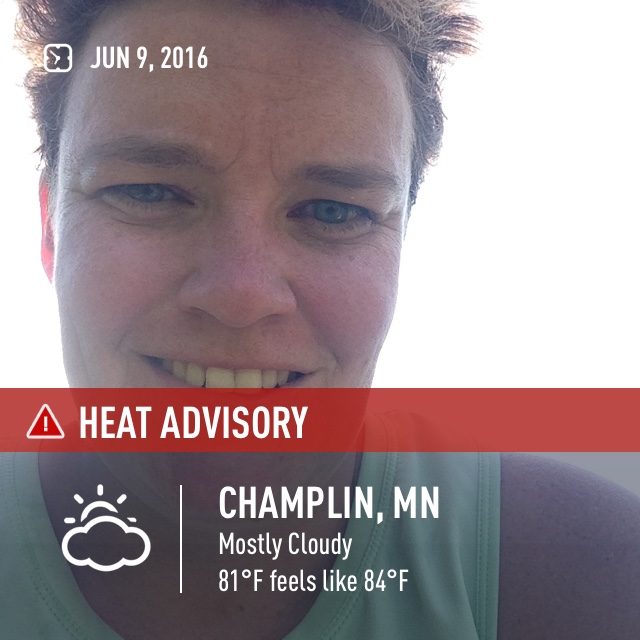
Weather: Hotter than fire.  It was around 84* and about 80% humidity (or it felt like it was that humid)  Winds were out of the south, and they were a pleasure.


Execution:
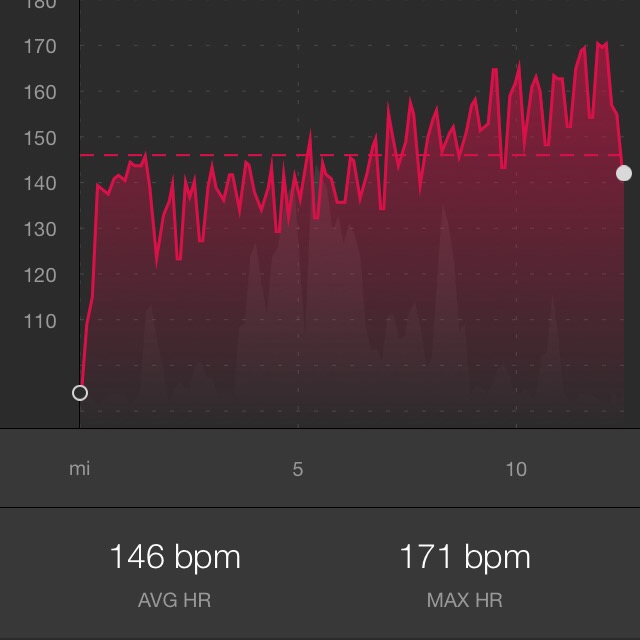
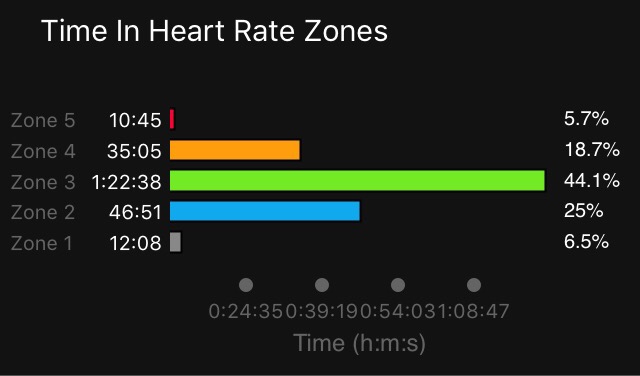
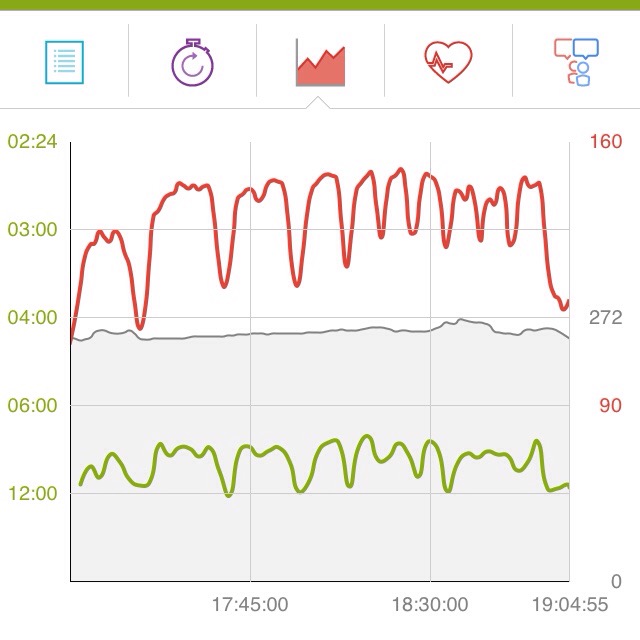
Miles 0-4: I did a warm up and then ran over a mile (gotta get that in first) and then I went into 5:00 run, 2:00 walk intervals.  I was surprised that my heart rate stayed as low as it did in the beginning.
Miles 4-8 (the circle at the bottom): I was starting to walk up more of the hills, and starting to get a bit impatient with the pace.  My heart rate was creeping into the higher 140s but still very manageable
Miles 9-12: I stopped looking at heart rate.  I just wanted to be done.  I did go much faster for the intervals at the end.  My heart rate shot up like a champ and I was spent by the end.


Nutrition:  I carried 2 bottles of water, 8oz each and took at least 1 small sip every mile.  I had a couple of gummy chews but my stomach was seriously not into the food.

Bonus: Today was all about temperature management.  Bad decision today was to run outside.  Good decisions following the bad decision were to run intervals, run slower than typical most of the run, drink water regularly and watch my heart rate most of the time.  This run was hard, but not nearly as awful as I'd thought it would be before I started.


12.11.14

Monday: Adventure Day

Massive snow storms were predicted today.  I decided that I needed to keep a positive attitude about the snow.  I will be driving in it for some time to come.  So I named Monday as an adventure day, although without the driving.

Bus: I walked up a couple blocks to a bus stop.  Two different routes come to that stop.  So  I decided that whichever route came first was the one I'd take.  One route would take me to the Uptown Gym and one to Downtown.  Either way I could run.
Result: In a surprise twist, a neighbor was driving to work and spotted me and offered to give me a ride to the close gym, Midtown, which is hilariously inconvenient for busing because of routes and transfers.

Workout: I ran 4 miles on the track at the gym.  Because it's snowing *sleeting* outside.  I did a warmup, then 1 lap at 148-150 heart rate, 1 lap at 141-144 heart rate, etc and then a couple cool down laps.  I really had the urge to move and this worked out nicely.

Bus 2: I took the 21 all the way to the end of the line in Uptown, hopped off, grabbed coffee and made my way to the apple store.

Apple Store! I bought myself my very first iPad today.  I'd been wanting one since the beginning of time, but more so recently.  There's a few things that I do that work well on a touch screen but the iPhone is just a bit too tiny for them.  I'm now hunting down photo editing apps, so name your favorites.

Bus 3: I took one last bus home, and by then I was ready to call it a day.  It didn't really feel like an adventure until this guy was driving like he was running behind and there was no snow nor ice on the ground.  I could've lived without that part of it.

Home: I spent the afternoon getting to know my iPad.  We are still dating.  I also grabbed clothes for tomorrow, and for the gym, and made myself lunch.

11.11.14

Sunday: Lake Harriet Sans Snow

Sunday morning: last run without snow for 2014.  Massive snow storms were predicted for Sunday night and all day Monday, so I had to get out and run one more long run without cleats or twenty five pairs of socks.  Minnesota already appears to have gone gray.  All the color between the sky and the ground is gone.  I won't see it again until spring.  Le sigh.
I ran an interval training workout that I had programmed into Endomondo.  It builds some walks in.  When running, I try to keep my heart rate on the higher side of aerobic for me, 148-152.  Walk breaks allow me to 'burn hot' for a longer distance.  I've run this interval workout a few other times, and it gets quite challenging by the end.  This time I got a couple extra breaks waiting for lights at Nicollet and Lyndale.

9.11.14

iOS 8 Updates: Nike and Strava and Endomondo

I use my running apps on an iPhone, so the iOS 8 update was a big deal.  Every year I notice an iOS update the week before Twin Cities Marathon, and every year I refuse to update until after race weekend.  This year was the same.  Here's what I've noticed about the apps.

Strava: I cannot tell one single difference.  In a very good way.  This app wins the prize for being the only one that found my heart rate monitor straight away, without needing to re-pair it.

Nike+: Nike+ and I have always enjoyed strained relations but we had recently achieved a detente of sorts.  The iOS 8 update blew that all to hell.
  • Health kit: I never uploaded/integrated/whatever the health kit.  Apparently now there's a way for me to connect some kind of heart rate monitor?  I can't figure it out.
  • Music controls: are 10 kinds of screwed up.  The music sort of insists on having the controls go through the app while listening to itunes, but interacting with the app at all during the run seems to impact playback in less than ideal ways.

Endomondo: Still my favorite app and my favorite website.
  • Heart rate monitor: I had to re-pair my heart rate monitor after the update.  This wasn't the only app that had this issue, but I didn't notice until some runs were completed so I was kind of bummed.
  • Vibration: A feature lost in an earlier update seems to be restored.  The phone now vibrates at the end of a lap in addition to giving an audio cue.  I really missed that feature and am glad to see it back.
Some other information, since many many people seem to search these things:
  • Interval workouts: Not available with Nike+ nor Strava, available with Endomondo Premium (or legacy Endomondo Pro)
  • Goal workouts: Nike+ allows goals by distance, time, or speed.  Endomonodo allows goals by distance, time, and on Premium accounts also calories burned.  Strava allows goals of time or distance on premium accounts only.
  • Foot pods: No.  Just, no.
  • Heart rate monitors: Endomnodo and Strava seem to support loads of these. I use a Mio Alpha with no problems.
  • Running indoors: Nike+ has an indoor setting that uses the accelerometer on the phone.  Endomondo and Strava do not support indoor running.

23.1.14

2014 Smartphone Running Apps: Nike+, Endomondo and Strava

About a year ago, I wrote this post and that continues to generate a significant amount of traffic to the blog.  Things have changes in the past year, so it's time to write an update (and slightly apologize to Nike+ because it does actually work indoors).

Nike+ Ipod is the old school app on the list.  It works with several generations of iPod Touch and iPod Nanos, and may require a separate foot pod that costs $19 and lasts a long time.  I include it here because it does work on an iOS smart phone and it has its uses.
  • Favorite feature: works reliably indoors or outdoors and doesn't require GPS.
  • Weakness: tends to report wonky data for workouts that include walking and running
  • I keep using it because it's winter in Minnesota and I do a significant miles inside

Nike+ Running is the GPS friendly app from Nike, and very similar in features to Nike+iPod, with the same website.
  • Favorite feature: it actually does work inside see below and handles run/walk workouts quite well
  • Weakness: the website, which is user friendly but not feature rich and doesn't always display data correctly.  See here for a full account.
  • I keep using it because it actually works inside and sometimes I forget my iPod or want to listen to the music on my phone.

And now, Sorry to Nike.  Last year I said basically, no this app doesn't work for indoor running.  And then I had a desperate situation one night at the gym (when I'd forgotten an iPod or a foot pod or something) and grudgingly tried it out.  I used it in my armband, even though it said not to.  (No way am I carrying this phone in my hand for that long.)  It worked pretty well actually.  I've found the app handles particularly well in run/walk workouts which had always been a weakness of the iPod app.
I do think Nike makes a mistake on their website, indicating that the phone only tracks indoor runs when handheld.  Because that would be silly.  I turn on the app and put my phone in an armband and have found it to be quite accurate, even though the website assures me the consequences for doing so will be dire. 

Endomondo is an app I found when I was using an Android phone and I've loved it ever since.  It has this wild pricing situation where there's a free app and website, or a "pro app" that's a one time cost but doesn't include a 'premium' website subscription, and then there's this 'premium website and app' subscription which is a monthly or yearly cost. I upgraded to the pro app because I wanted the interval workout feature.  It was totally worth the $4.99.  I'm cheap so I still refuse to pay for the premium website.
  • Favorite feature: the greatness of the website.  Even with the free versions of everything, this website is easily the most feature rich and gives a lot of useful data.  It will break down my fastest mile, 5K, 10K times.  It's also easy to edit workouts and add workouts to specific routes so I can watch myself get faster.  Bonus favorite features are the interval workout option on the Pro App, and the variety of sports that can be tracked.
  • Weakness: It doesn't work indoors.  The fact that it doesn't work for indoor workouts is the only reason I know about these other apps.
  • I keep using this app because it's my favorite.  It has the most features (free or Pro versions) and the best website.
 
Strava is a new app that I tried out this year.  It pairs with about a million devices (can't tell if more or fewer than Endomondo) and has some unique features.
  • Favorite feature: 'time moving' is tracked, versus the entire workout.  It analyzes GPS data and disregards the time I'm standing at a stop light at Cedar Ave waiting to cross, or the time I scrape the snow off my car and forget to pause the app at the end of a workout.  It's nice on workouts with lots of stoplights but tends to tell me a faster pace for other workouts.
  • Weakness: Distance is measured by the tenth of a mile.  In every other app I've ever tested (including many not mentioned here), distance is given in the hundredth of a mile, which I prefer.  As I mentioned before, pace always looks faster in this app than Endomondo or Nike+ because of the whole "time moving" thing.  Rounding up distances at the end of a workout just exacerbates the problem.
  • I keep using this app because I think it draws the prettiest maps, and I like the graphics for the elevation data as well.  You've seen both on the blog. I promise.


After using a few different apps all year, and seeing what people search for that leads them to this post, I added some new categories, and kept most of the ones from last year.
  • Outdoors: Obviously the app has to work for running outdoors, or it would've been silly for me to include it.
  • Indoor track: Because it's winter in Minnesota and I continue to run.
  • Treadmill: Not many smart phone apps cooperate with treadmill runs.  It's kind of surprising.
  • Foot pod: Because "endomondo+foot pod" is one of the most searched things on this entire blog, which apps work with a foot pod attached to your shoe.
  • Foot pod imports: some apps don't allow a foot pod but will import data from a different platform.
  • Interval workouts: Does the app allow interval workouts, and give audio cues for high intensity, low intensity, etc.  Couch to 5K has taught a lot of people to run this way, and it's a feature that's sorely missed once runners graduate to a different goal.
  • Walking: All of these apps calculate pace and calories burned (lovely).  Calories are burned differently when we walk.  Can the app handle it?
  • Other sports: Can the app track sports besides running?
  • Goal Setting: Can I tell the app "I want to run X miles or X minutes or at X pace" for a workout?
  • Shoe Tracking: Does the app or website keep track of how many miles I've run in a particular pair of shoes?
  • Cost of the app for the smart phone: because I'm cheap.
  • Cost of the website subscription: I'm seeing a new business model (which annoys me because I'm cheap) where the apps are free, and some basic data is free, but then there's an up-charge for a premium service which adds tons of other data.
  • Heart rate monitors: Will the app integrate data from a heart rate monitor?  I'm thinking of getting one this year, so it's important.
  • Platforms: Which apps cooperate with which smart phones.


16.7.13

Nike+ App Can't Do Intervals: A Review Update

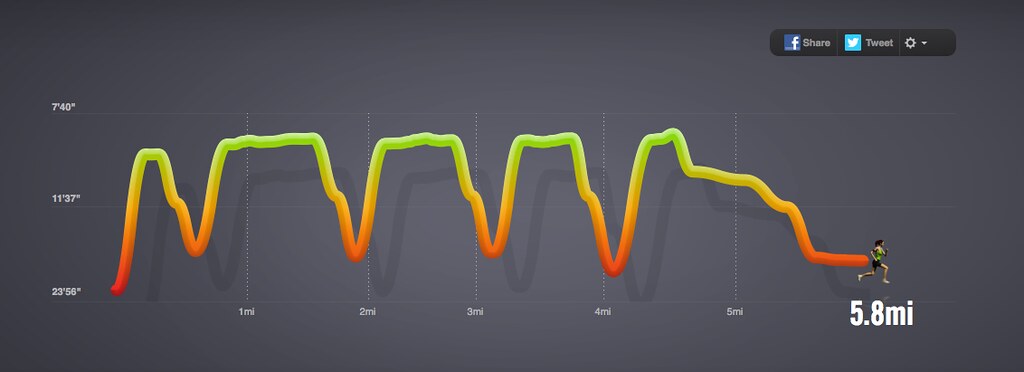
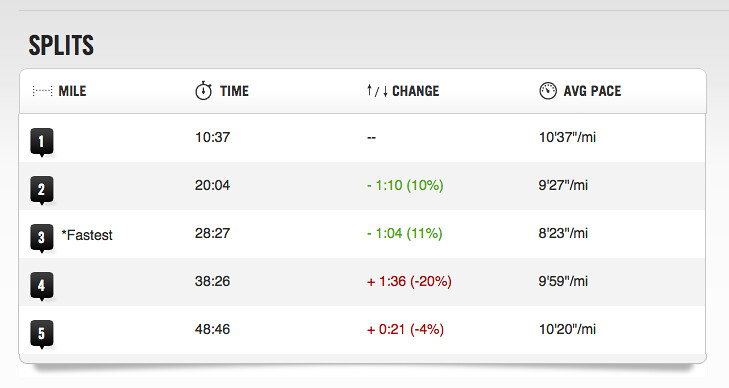
I've talked about the Nike+ Ipod App lots and lots on this blog, mostly because it's what I use for running inside.  Apparently I've mentioned it enough times that search engines are finally pointing to those blog posts when people search for "Nike+ App can't do intervals".  I'm saying.  The website doesn't even display interval data correctly for the workouts I do now.  

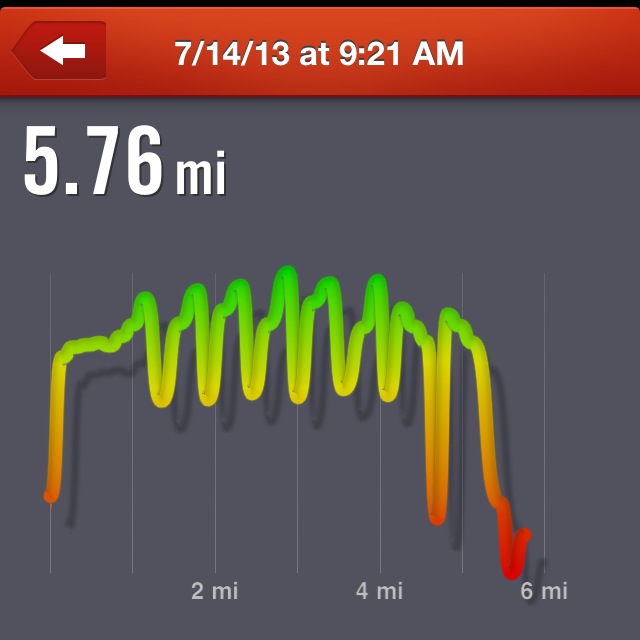
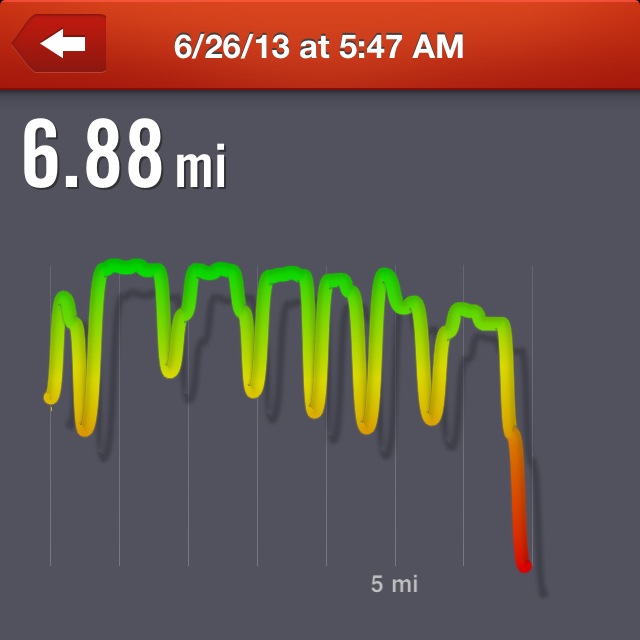
I'm sure there's a programming reason why my computer screen with it's excellent resolution and 13" of real estate can't find the pixels to make this line go up and down any more accurately.  How can I blame a computer person for this? Strangely, the Nike+ app on my phone is far superior when it comes to displaying interval workout data correctly.  Here's some side by side comparisons for a couple recent interval workouts.  Screen grabs from the Nike+ Site are on the left, screen grabs from the Nike+ iPhone app are on the right. Having been there, I assure you that the iPhone app is displaying the data much more accurately than the website.  The only way to get good data is to look at a four-inch screen.  Awesome.  I'm hoping the Nike+ app will eventually support some kinds of interval workouts.  I'm really hoping as the app gets better, someone remembers to improve the website as well. 


**Interval workouts are workouts that involve running, then walking for fixed periods of time; advanced runners will do hard running and then slow jogging for fixed periods of time.  An example of an interval workout is 30 seconds of hard running followed by 90 seconds of jogging, repeated 10 times.**

2.2.13

Smartphone Running Apps - Nike and Endomondo and an iPod. Oh My!

Update: Check out the 2014 Review of Apps with some new information, and a mea culpa to Nike.

My own personal experience with several different smartphone apps for running, since I now have a smartphone that can't be crashed by turning on the GPS.  I took my cue from Lifehacker and their review of running apps.  For an Android specific list of apps, go here. I tried to consider
  • Does the app work for outdoor runs? (I mean, they all do but there's a couple differences?
  • Does the app work for indoor track workouts? It's colder than snot up here and I need to be able to run indoors right now.
  • Does the app work for treadmill workouts?
  • Does the app work for run/walk interval workouts?
  • Does the app work for walking? Not as common as you'd think.
  • Does the app work for sports besides running? Like scuba diving or kayaking?
  • Is goal setting a feature?  (For example, can I say "I want to keep running for 45 minutes?)
  • Does the app let me track how many miles I've run in a particular pair of shoes?  Relevant.
  • Does it work on iPhone?  Android?
  • What's the cost?
  • What's the website like? (You know it's connected to a webiste).

Nike+ iPod (also works with iPhone) is the oldest run tracker on the list.  It came out when the iPod Nano model was brand new.  I got my first one in 2007 as a graduation present from Qat Lady, my Pooky Bear and Pooky Bear's Prince Charming.
  • Outdoors - works with a foot pod in/on a shoe.  The more the pod comes pre-calibrated, but can be adjusted.
  • Indoor track - works with the foot pod.  (Only one on the list, and the reason I can't give up my iPod entirely.)
  • Treadmill - yes, it actually does work with the foot pod.
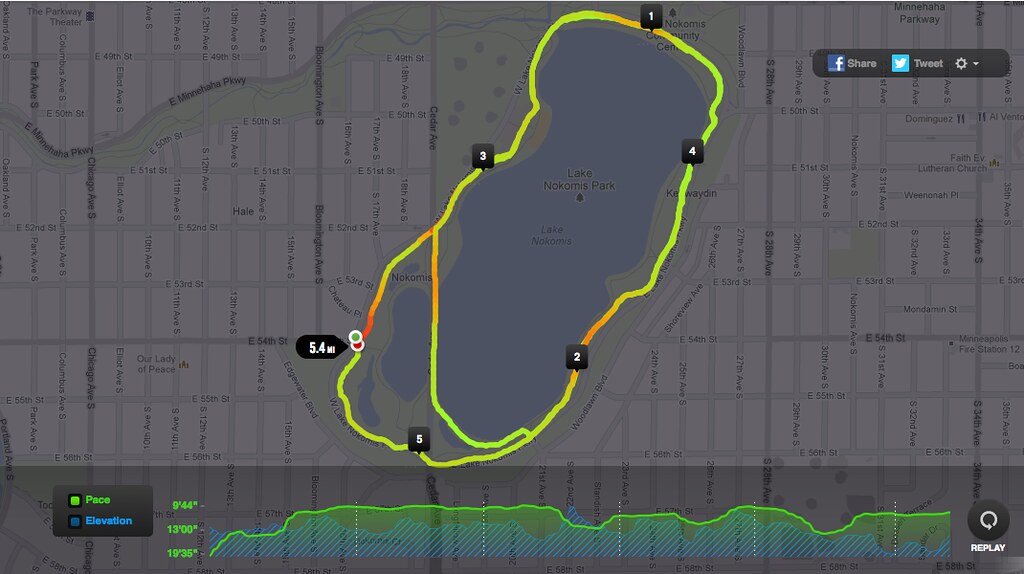
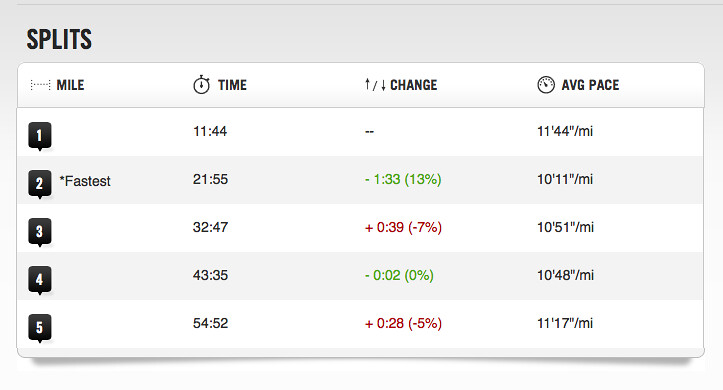
  • Run/Walk Intervals - this doesn't really work for run/walk intervals.  (Or maybe it's just the webiste that doesn't display the data correctly?  I'm not really sure.)  It seems to get fairly inaccurate the more I change my pace.  (See the picture below.)
  • Walking - sort of.  Time and distance are accurate for walking, but "calories burned" is still based on running and so way high for the version I have.  The website says new versions of the iPod Nano have a pedometer and can track how much you walk all day
  • Other sports - No.  At least I don't think so.  I'm told that at some gyms there's workout equipment that works with one of the Nike+ apps, but I don't think it's this one.
  • Shoe tagging - yes, now I can know how far I've run in my shoes.  (It's probably tragically way too far.)
  • Goal setting  - Yes, allows for setting time, distance or calories burned goals and gives vocal feedback on progress.
  • iPhone - yes, but also requires the foot pod.
  • Android - sadly, no.
  • Cost - I actually have no idea.  The shoe sensor is $19.  I use the sensor with my iPod touch.  Really old iPod nanos will also need a receiver; the receiver and sensor together are $29.  From the site it looks like newer nanos don't need the footpod, but I wonder if they're plagued by the same "hold it in your hand" issues as the next app.
  • Webiste - has some basic information.  There's about a billion screen shots on this blog.
  Nike+

Nike+ App (I believe it was formerly known as Nike GPS). I think at one time, this app actually cost money.  It's free now. 
  • Outdoors - Yes, uses GPS.
  • Indoor track - No.  I'm saying no; the app would want me to tell you "yes, but you have to hold your $700 iPhone in your hand while you're running".  That's what armbands and pockets are for.
  • Treadmill - No.  See above.
  • Run/Walk - Yes.  (As good as any other.)  It uses GPS for pacing data.  The "calories burned" data are going to be based on running the whole time.
  • Walking - Yes, basically.  It uses GPS for pacing data.  Again, the "calories burned" section is going to be off.
  • Other sports - No.  Just, no.
  • Shoe tagging - Yes definitely.
  • Goal setting - Yes, allows for setting time, distance or speed goals and gives vocal feedback on progress.  (I've never done a speed goal, it's based on past personal bests at various distances.)
  • Works with iPhone - Yes.
  • Works with Android -Yes.
  • Cost - free app.  (I swear this one used to cost money.)
  • Website - same as the Nike+ iPod website; it will draw maps when GPS is being used in a workout but doesn't provide much other data.  The map is the most laughably small thing I've ever seen and there doesn't seem to be a way to zoom or make it larger. 


Endomondo


Endomondo is an app I discovered when I had my other phone.  (Other website here.) I used Endomondo some for running and really enjoyed it.  I used it most for biking.  I'm talking here about the free version; I've never used the Pro version or signed up for a premium membership.
  • Outdoor - Yes.  Uses GPS.
  • Indoor track - No.  Sigh.
  • Treadmill - No.
  • Run/Walk Intervals - Yes, with the same caveat at the Nike+ app.  (The Pro version says it can do interval workouts. Maybe one day I'll spend the $5.)
  • Walking - Yes.
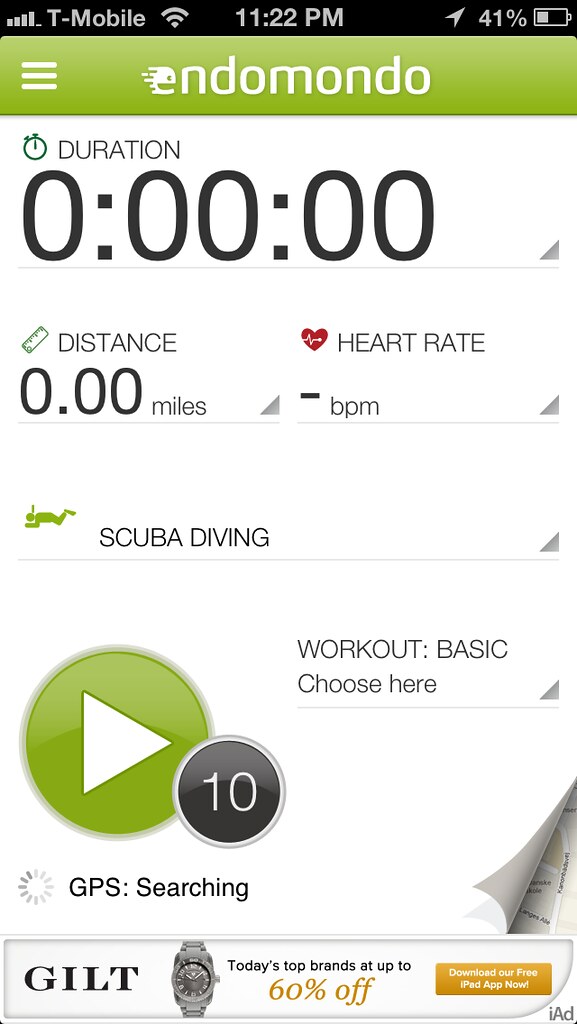
  • Other sports - Yes.  Like I said, I use it for biking all the time.  It's got tons of random sports where I can't imagine how the thing even works.  (Scuba diving, I'm looking at you.)  I'd imagine the most popular ones are running, walking, biking (with options like "sport", "mountain biking" or "transportation) and in Minnesota I'm sure skating and skiing are popular.
  • Shoe tagging - No. 
  • Goal setting - Allows goal setting for distance, or for racing against previous time on the same route (if it's saved), or for racing a friend.
  • Works with iPhone - Yes.
  • Works with Android - Yes.
  • Cost - $0 for the basic versions.  $5 for the premium app, or $20/year for the premium website. 
  • Website - hands down the best website of all three.  Most importantly, the map can be made into a full screen feature and provide mile splits and real time pace information.  It has tons of other information like the fastest 1K, mile, 5K, 10K, 1 hour of the run.  For really long runs I think it gives 10 mile and half marathon splits but it's been a while.